
How to use this glossary
Hivra gives each supported agent a computer of its own. Most of the words below follow from that one idea, and several of them sound alike (computer, host, server, capacity), so the first two sections are worth reading in order. After that, jump to the section you need.
Each definition says what the word means in Hivra, uses the exact label you will see on screen where there is one, and links to the doc that goes deeper. The term itself is in the left column. Where a definition bolds a name, that is a real label on screen.
Hivra is an independent hosting service. It is not affiliated with the companies and projects that make the supported agents, so when this page names an agent it describes how that agent runs on Hivra, not the agent itself.
| Section | Terms |
|---|---|
| The big picture | Agent, supported agent, computer, Hivra Cloud, connected server, host, capacity, runtime, provisioner, gateway |
| Plans and sizes | Plan, size, vCPU, account code, free account |
| Launching | Launch, Choose, Review, model access, Hivra credits, Venice, your own API key, sign in with your own account, API keys, Browser toggle, template, shared agent memory |
| Inside an agent page | Chat, Dashboard, Browser, Computer, Desktop, Files, Changes, Terminal, agent session, Skills, Telegram, Tasks, Manage |
| Looking after it | Power, Sign in again, Updates, Recovery, Private network, Computer Contract, Activity, Needs you |
| Computer types and servers | Ubuntu Desktop, Linux computer, Linux Sandbox, Omarchy, Proxmox VE, gVisor, tmux |
| Status labels and other terms | Available, Alpha, Preview, Aeon and GitHub Actions, Buzz, self-hosted Hivra |
The big picture
These are the nouns that everything else hangs off. If you only read one section, read this one.
| Term | What it means | Read more |
|---|---|---|
| Agent | An AI program that can act for you: read and write files, run commands and, where it has one, use a browser. In the dashboard an agent is something you launch, name, open and manage. Each agent runs on a computer of its own. | A tour of the dashboard |
| Supported agent | An agent Hivra can launch for you. The list is in Launch, and each has its own docs page: Claude Code, Codex, Hermes, OpenClaw, Agent Zero, Aeon and DeepSeek Harness. New Hermes launches may not yet be available on every Hivra site, and Launch shows what you can start. Previews are covered under Status labels below. | Launch your first agent |
| Computer | A private virtual machine, isolated from your own laptop and from other people's machines. An agent lives on one and keeps its files, logins and history there. A computer can also exist without an agent, for example an Ubuntu Desktop you use yourself. | Ubuntu Desktop |
| A computer of its own | Hivra's phrase for the one-agent, one-computer arrangement. The agent's tools, files and login live on its computer, not on the machine you are typing at. It is a boundary, not a promise that the agent is safe. | Security and access |
| Hivra Cloud | Computers that Hivra runs for you, so you do not manage any hardware. Every one needs a paid plan. | Plans and billing |
| Connected server | A machine you own and connect to Hivra, so a launch can run on it instead of on Hivra Cloud. Connecting costs nothing in Hivra, and it works with a free account. | Connect your own server |
| Host | The physical or virtual machine that actually runs computers. On Hivra Cloud the host is Hivra's. On a connected server the host is yours, and whoever controls it can reach what runs on it. | Security and access |
| Capacity | Room to run computers. The Servers page asks How would you like to add capacity? and offers three answers: Let Hivra host it, Use my cloud account and Connect my own machine. | Connect your own server |
| Runtime | The software that makes an agent work on its computer: a command line tool for Claude Code and Codex, or a web app for agents such as OpenClaw and Hermes. Where the docs say the runtime runs on the computer, they mean the agent itself runs there, not in your browser. | Open your agent |
| Provisioner | The versioned bundle of scripts Hivra installs on a host to build computers and set an agent up inside them. Releases are dated, such as 2026.11.10.5, and some agents need a host on a minimum release. | Connect your own server |
| Gateway | Hivra's authenticated gateway. It is how you reach an agent's web app, Terminal, Files and desktop: you sign in to Hivra, and the gateway passes you through to the computer. Apps such as OpenClaw and Agent Zero listen on the computer's localhost only, so the gateway is the only way in. | Security and access |
Every computer that Hivra Cloud runs for you needs a paid plan, from $9.99 a month for 2 vCPU and 4 GB of RAM. A free account works with a computer or server you connect yourself.
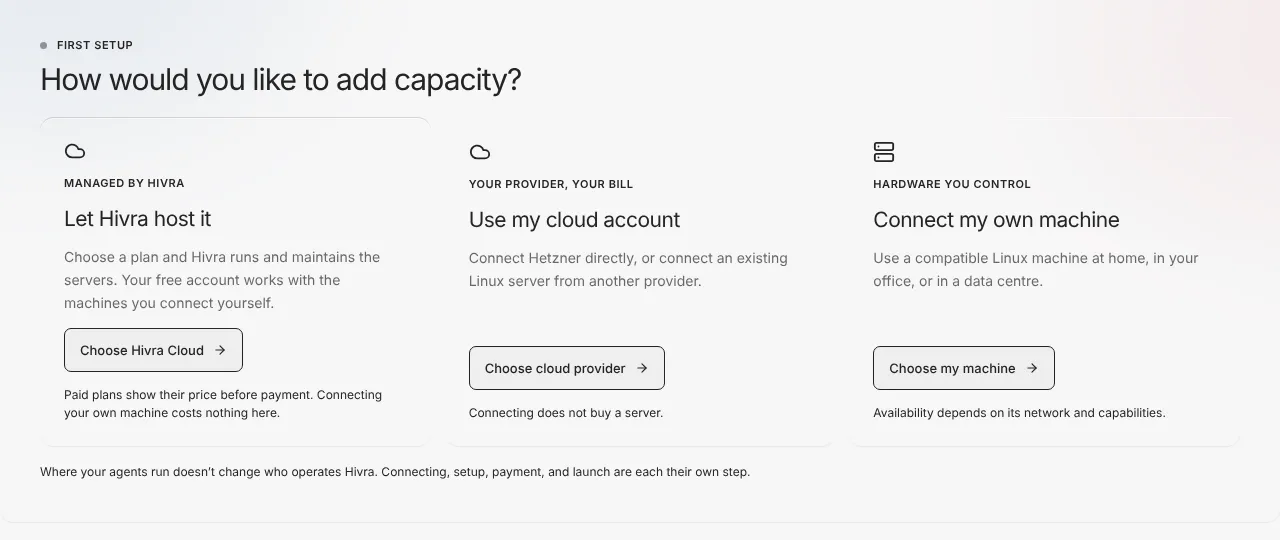
If the difference between Hivra Cloud and a connected server is the thing you are deciding, the short version is this. On Hivra Cloud, Hivra runs the host and administrators keep infrastructure access to it. On a connected server you run the host, Hivra does not become its operator, and the work counts against your own hardware instead of a Hivra plan.
Plans and sizes
| Term | What it means | Read more |
|---|---|---|
| Free account | A Hivra account costs nothing. It lets you sign in, use the dashboard and connect your own server. It does not include a Hivra Cloud computer. | Plans and billing |
| Plan | What you pay for when you want Hivra to run computers. Paid plans start at $9.99 a month for 2 vCPU and 4 GB of RAM, and the next size up is $19.99 a month for 4 vCPU and 8 GB of RAM. A plan is a pool of processor and memory your computers share. Model usage is billed separately. | Plans and billing |
| Size | How much processor and memory a computer reserves. The Review step shows it as Small, Medium or Large with the CPU and memory it reserves, and offers a Change button. Each agent has a smallest size it can launch with. | Launch your first agent |
| vCPU | A virtual processor core. A plan's size is quoted in vCPU and GB of RAM. The dashboard often writes it as CPU. | Plans and billing |
| Account code | A short code shown in the sidebar and in Settings. Hivra's server setup command shows the same code before it connects a server to your account, so you can check the two match. If they differ, stop. | Connect your own server |
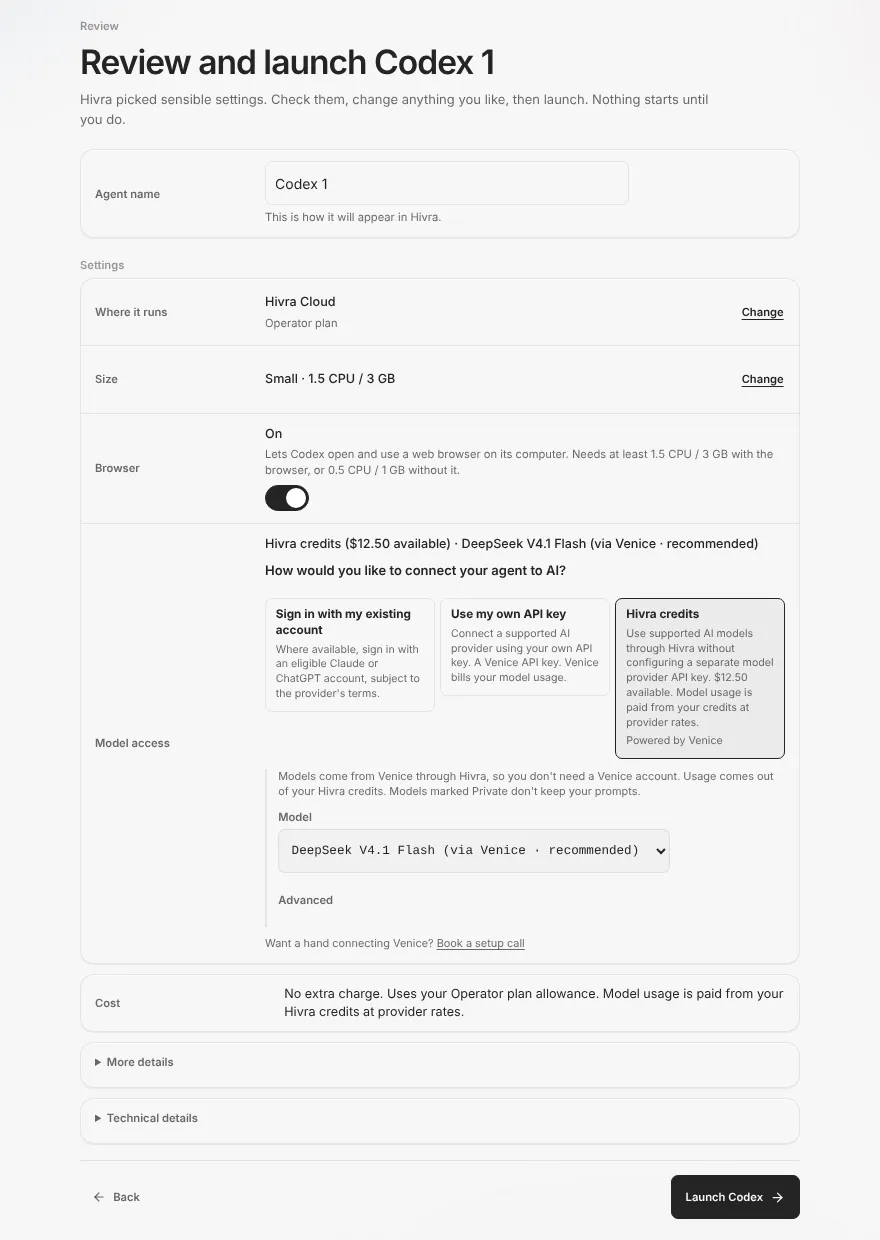
| Cost | A row on Review that says what the launch will cost before anything starts, including whether it uses your plan's allowance and that model usage is paid from your credits at provider rates. | Launch your first agent |
Plan names inside checkout can differ from the sizes the public site describes, so these docs talk about plans by price and size. Stopping a computer does not cancel your plan or any provider billing.
Launching
Launch is the one place to start an agent or a computer. These are the words you meet there.
| Term | What it means | Read more |
|---|---|---|
| Launch | The sidebar entry and the journey that starts an agent or a computer. It has two steps, Choose and Review, and nothing starts until you press the final Launch button. | Launch your first agent |
| Choose | Step one, headed What do you want to launch?, with two groups: An agent and A computer. Each tile has a short description and, where it applies, a note on whether it fits your plan. Where it runs is chosen later, on Review. | Launch your first agent |
| Review | Step two. You name the agent, and see Where it runs, Size, Browser, Model access and Cost, then press Launch or go Back. | Launch your first agent |
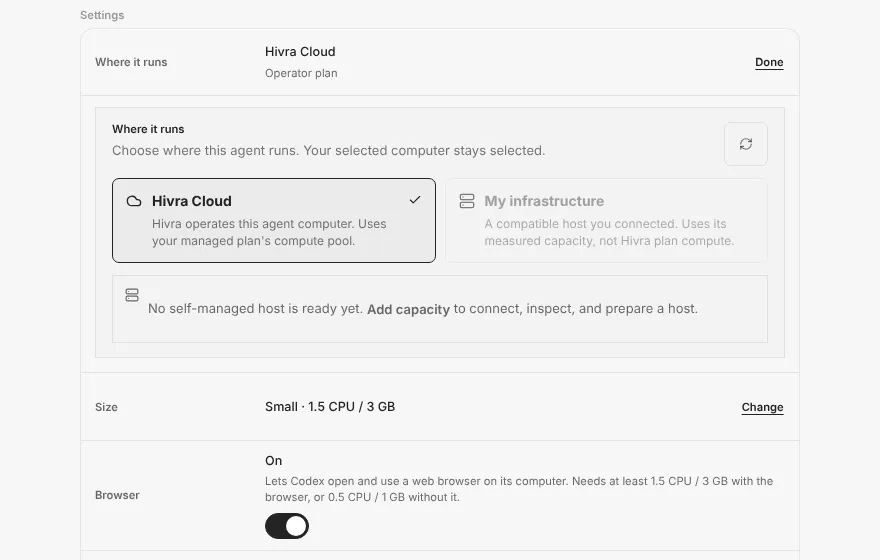
| Where it runs | The destination row on Review. Hivra Cloud is the default where your plan allows it. A connected server appears as a choice once one is ready, and the panel says so when none is. | Connect your own server |
| Model access | How the agent reaches an AI model. Review asks How would you like to connect your agent to AI? and offers up to three choices: Sign in with my existing account, Use my own API key and Hivra credits. Each agent shows only the ones it supports, and explains why a choice is unavailable. | Models and credits |
| Hivra credits | A balance you spend on model usage. It lets an agent use supported models through Hivra without a separate provider key. Usage is paid from the balance at provider rates, and an empty balance is not the same as a balance Hivra could not read. | Models and credits |
| Venice | The service Hivra credits reach models through. If you bring your own key for most agents, it is a Venice key and Venice bills the usage. Models marked Private do not keep your prompts, according to Launch's own note. | Models and credits |
| Your own API key (BYO key) | A key you paste for a launch. It is sent to the agent's computer. It is a Venice key outside Hermes, and Claude Code does not take one at launch. Where a key is yours, there is no Hivra markup on that usage. | Models and credits |
| Sign in with my existing account | Claude Code can use an eligible Claude account and Codex can use ChatGPT, signed in inside the agent after it opens and subject to the provider's terms. Other agents use this slot for their own setup screen instead. | Models and credits |
| API keys | The Settings row, described there as provider keys and which agents use them, where you can save a model key so you do not paste it again. The code and the page address call it the Vault. Launch lists saved keys by name and a preview, never the key itself. There is one saved key per provider, so saving a new one replaces the old. | Models and credits |
| Browser toggle | A Review switch that lets the agent open and use a web browser on its computer. For agents that have a browser switch (Claude Code, Codex, OpenClaw), turning it on raises the smallest size from 0.5 CPU and 1 GB to 1.5 CPU and 3 GB. Other agents have their own smallest size, and Review shows it. | Launch your first agent |
| Template | A saved, configured agent you can launch again later. Each template can copy a share link, launch from it or be deleted. They live under Settings. | A tour of the dashboard |
| Shared agent memory | Text in Settings that is given to every new agent you deploy afterwards. Each agent still keeps its own notes as it works. | A tour of the dashboard |
Inside an agent page
Opening an agent takes you to its page. The sidebar groups what you can do there as the agent itself, its browser, its computer, and its settings. Which entries appear depends on the agent and on whether its computer is running. Chat agents (Claude Code and Codex) get Chat, Skills and Telegram. Agents whose interface is a web app on their computer get Dashboard, Terminal, Files and Manage, plus Browser where the agent has one, and no Skills or Telegram.
| Term | What it means | Read more |
|---|---|---|
| Chat | Your conversations with a command line agent such as Claude Code or Codex, with a message box and a New chat button. Hivra's chat bypasses the command line tools' own permission prompts by default. | Open your agent |
| Dashboard | The first row for agents whose interface is a web app on their computer, such as Hermes, OpenClaw, Agent Zero and Aeon. It shows that app inside Hivra, behind your sign-in. | Open your agent |
| Browser | A view of the browser the agent drives, for agents that have one. It stays listed while browser automation is off so you can find the switch, and it explains that it is off. | Open your agent |
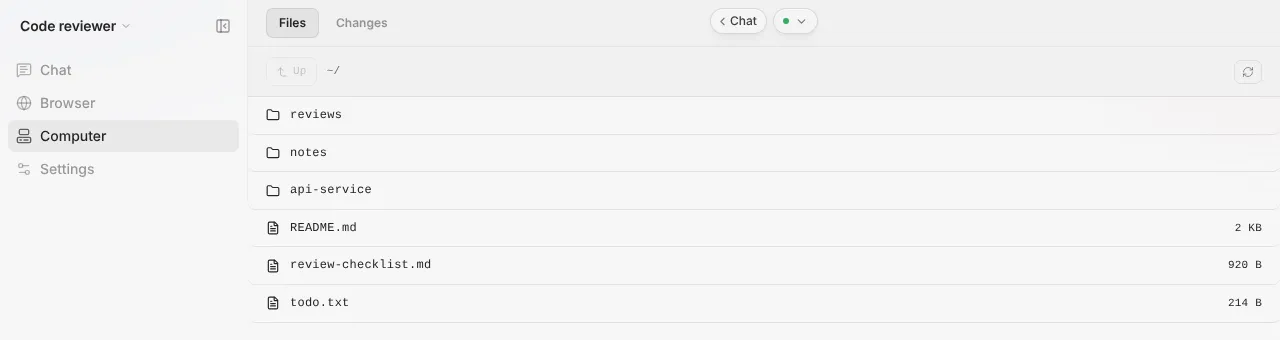
| Computer | The sidebar group for looking at the agent's computer rather than at the agent: Desktop, Files and Terminal. | A tour of the dashboard |
| Desktop | A graphical desktop you open in your browser, on computers that have one. An agent never owns a desktop of its own, so its Desktop entry explains how to give it one. A Linux computer has none. | Ubuntu Desktop |
| Files | A listing of the agent's home folder, with a Files and Changes switch at the top. | Open your agent |
| Changes | The Git view inside Files: what the agent changed in its repositories. Git is not a separate tab. | Open your agent |
| Terminal | The Terminal tab under Computer is a plain shell on the agent's computer. It is the right place to start long running work inside tmux (tmux is installed on Claude Code and Codex computers). | Open your agent |
| Agent session | The agent's own command line, labelled with its name, such as Claude Code session. It sits next to Chat. It is not the same thing as the plain Terminal. | Open your agent |
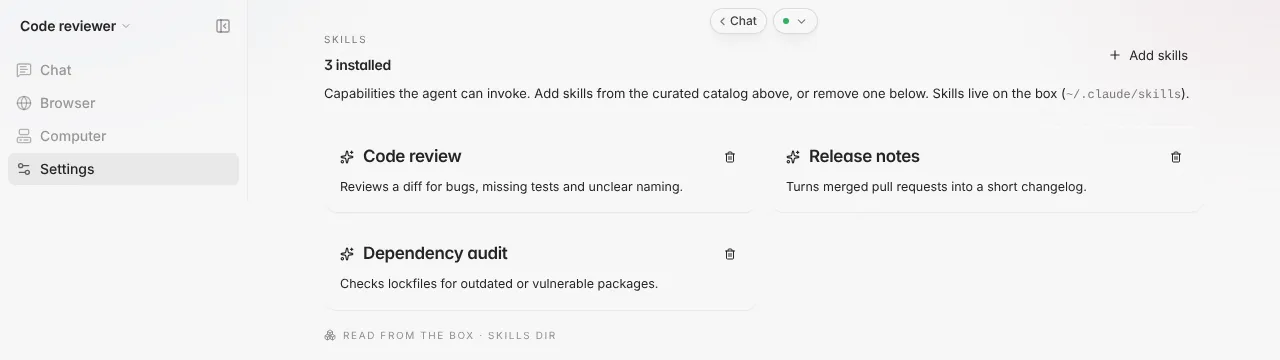
| Skills | Chat agents (Claude Code and Codex) only. The skills installed on the agent. You can add more with Add skills and remove one with its delete icon. | Claude Code |
| Telegram | A view under Manage on Claude Code and Codex agents. It connects your own Telegram bot to the computer, and the work you send through it runs on the computer, not in your browser. Hivra has verified it for Claude Code only. | Telegram |
| Tasks | A surface for scheduled tasks. No Hivra agent shows it today, because Hivra computers have no scheduler for it. | A tour of the dashboard |
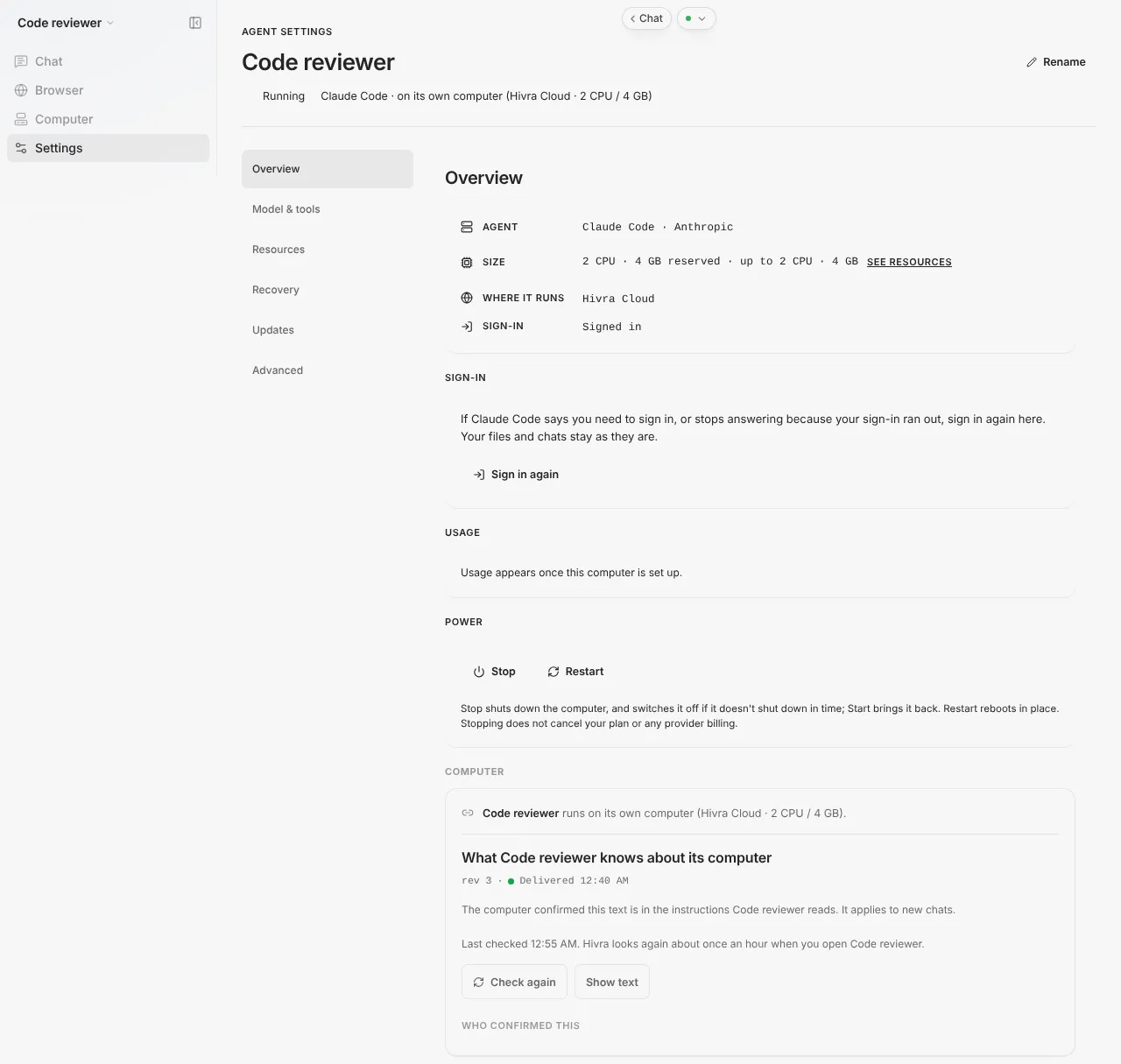
| Manage | The control panel for one agent and its computer. The sidebar shows it as Settings, and the code and these docs call it Manage. Its side list holds Overview, Model & tools, Resources, Recovery, Updates and Advanced, plus further sections where the computer supports them. | A tour of the dashboard |
Terminal and agent session are the pair people mix up most. The Terminal is a shell on the computer, and it is the same for every agent that has one. The agent session is the agent's own command line tool, and it is only there for Claude Code and Codex.
Looking after it
| Term | What it means | Read more |
|---|---|---|
| Power | The Overview controls that Stop, Start or Restart the computer. Stop shuts it down, and switches it off if it does not shut down in time. Restart turns the computer off and on again. | Troubleshooting |
| Sign in again | The Overview button to renew an agent's own login, for example when Claude Code says you need to sign in. Your files and chats stay as they are. | Claude Code |
| Updates | The Manage section for updating the agent software and the connection service. Hermes updates with hermes update in the Terminal or the Update Hermes button. | Update an agent |
| Recovery | The Manage section for restore points and folder recovery, where the computer offers them. It is not a guarantee that anything is kept. | Update an agent |
| Private network | A Manage section that connects an eligible Ubuntu computer to your own private network. It creates a private address and does not publish services or open ports. Older computers may not be eligible. | Security and access |
| Computer Contract | The text Hivra gives an agent about its computer, so the agent knows what it has. Manage shows it as what the agent knows about its computer, marked Delivered once the computer read back the exact text and Update pending until then. | Security and access |
| Activity | The page that answers what your agents did and whether anything needs you. Its tabs are History and Runs, plus Needs you only while something is waiting and Usage on hosted dashboards. | A tour of the dashboard |
| Needs you | A badge and the first tab on the Activity page, both of which appear only when an agent or computer needs you, for example a launch that failed. The Home page calls the same items needs attention. | Troubleshooting |
Two sentences about keeping work running belong here, because people ask. On a paid Hivra plan the computer stays on and keeps your files, sessions and login. A Claude Code or Codex run you start inside tmux in the computer's Terminal tab keeps going after you close the laptop. On Claude Code, work you send through Telegram, connected in the agent's Telegram tab, runs on the computer, not in your browser. Hermes, OpenClaw and Agent Zero run on the computer itself, and Aeon's scheduled tasks run on your own GitHub Actions while the computer hosts its dashboard. None of them needs an open browser.
Computer types and servers
A computer is launched from a template for a particular kind of machine. These are the kinds you can launch today, with the condition that goes with each.
| Term | What it means | Read more |
|---|---|---|
| Ubuntu Desktop | An isolated Ubuntu computer with a desktop you open in your browser, plus files and a terminal. It runs on Hivra Cloud or a Proxmox server you connected. | Ubuntu Desktop |
| Linux computer | A light headless Ubuntu computer with a terminal and files, and no desktop. It runs on Hivra Cloud with a paid plan. Attaching an agent to it is not supported yet. | Linux computer |
| Linux Sandbox | A light Linux terminal and Python workspace on an Ubuntu server you connected, isolated with gVisor. It works with a free account. | Linux Sandbox |
| Omarchy | An Arch and Hyprland computer for development and AI work. It is offered as a prepared computer: a launch claims the one the site holds, so the tile appears only where one is set up. | Omarchy |
| Windows | A computer on a Proxmox server you connected, built from your own licensed Windows ISO. A Windows computer you bring is not one the platform supplies. | Windows |
| Proxmox VE | A virtualization server you run yourself. The agents on your own server, and Ubuntu Desktop, need a Proxmox VE server connected with its SSH details. | Connect your own server |
| gVisor | A container sandbox. The one-command Ubuntu connect gives you Linux Sandbox only, and it runs inside gVisor. | Linux Sandbox |
| tmux | A terminal session manager installed on Claude Code and Codex computers. A run started inside tmux in the Terminal outlives the browser, which is why the docs keep recommending it. | Open your agent |
macOS is not offered as a computer. Anything you see about it in other places is planned only.
Status labels and other terms
| Term | What it means | Read more |
|---|---|---|
| Available | You can launch it today. Docs about an agent or a computer say so at the top, and the status always matches the one availability file the team keeps. | Launch your first agent |
| Alpha | Launchable, but the version it runs is pinned at an upstream alpha release. DeepSeek Harness carries this label. | DeepSeek Harness |
| Preview | Built but off by default. OpenBot and Nuphos are previews: they appear in Launch only on a deployment that turns them on. | OpenBot and Nuphos |
| Available with a condition | Offered, but only in a particular setup. Omarchy is a prepared computer, and each public page says so. | Omarchy |
| Aeon and GitHub Actions | Aeon's scheduled tasks run on your own GitHub Actions with the AI key set on your GitHub fork. Its computer only hosts the Aeon dashboard. | Aeon |
| Buzz | A way for agents to collaborate, through a relay you connect and a sidecar installed on an eligible computer. It is something you connect, not something you launch. | A tour of the dashboard |
| Self-hosted Hivra | Running the whole Hivra platform yourself, as opposed to connecting a server to the hosted one. It is a preview, and a self-hosted installation hides Billing. | Connect your own server |
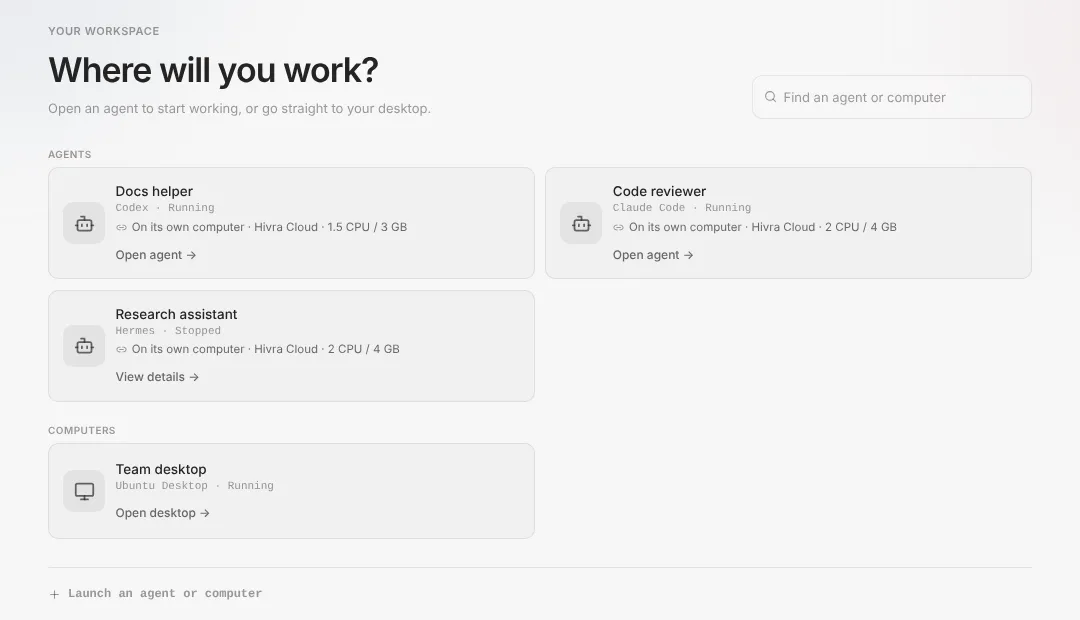
| Home | The page you land on, headed Where will you work?, listing your agents and your computers, with a search box and a Launch link. | A tour of the dashboard |
| Open | What you do to an agent or a computer. A running agent shows Open agent, and a running computer shows Open desktop. The docs say open it, not chat with it, because many agents have their own app. | Open your agent |
Still missing a word? The dashboard tour walks every screen in order, and Troubleshooting lists what the common error messages mean.
Common questions
What is the difference between a computer, a host and a server?
A computer is the private virtual machine an agent lives on. A host is the machine that runs computers, which is Hivra's on Hivra Cloud and yours on a connected server. A server is usually what you call the machine you connect yourself, and the Servers page is where you add it as capacity.
What is the difference between Hivra Cloud and a connected server?
On Hivra Cloud, Hivra runs the computers and every one needs a paid plan. A connected server is a machine you own that you connect to Hivra, which works with a free account and costs nothing in Hivra. Some agents run on Hivra Cloud only, such as Hermes and DeepSeek Harness.
Is Manage the same as Settings?
Yes, for an agent page. The code and these docs call the control panel Manage, and the sidebar shows the same entry as Settings. Its side list has Overview, Model and tools, Resources, Recovery, Updates and Advanced.
Is the Terminal the same as the Claude Code session?
No. The Terminal is a plain shell on the agent's computer. The Claude Code session, or Codex session, is the agent's own command line, and it sits next to Chat. Only Claude Code and Codex have one.
What does the gateway do?
The gateway is Hivra's authenticated entry to an agent's computer. You sign in to Hivra, and it passes you through to the agent's web app, Terminal, Files and desktop. Some apps listen on the computer's localhost only, so the gateway is how you reach them.
Are Hivra credits the same as my own API key?
No. Credits are a balance you spend through Hivra on supported models, which reach models through Venice. Your own API key is a key you supply, it is sent to the agent's computer, and the provider bills you for that usage. Each agent supports a different mix, and Review shows which.
Does stopping a computer stop the billing?
No. Stop shuts the computer down, but it does not cancel your plan or any provider billing. To change a plan, use Billing.