
What it is and who this page is for
DeepSeek Harness is DeepSeek's coding agent. On Hivra it gets a computer of its own: a private virtual machine where it keeps its files, repositories and settings. Hivra opens DeepSeek's own interface for you behind your Hivra sign-in, so you use the agent the way its makers built it.
This page is for developers and AI power users who want to try DeepSeek's agent on a computer that is separate from their laptop. It covers what you need before you start, how to launch it, how it gets its model, what you see once it is open, what alpha means here, the limits, and how to fix the problems the product itself reports.
Hivra is an independent hosting service and is not affiliated with or endorsed by DeepSeek. DeepSeek Harness is their software. The computer, the sign-in in front of it and the Manage views around it are Hivra's. For the upstream project, see its source repository.
Credentials may be stored on the agent's computer, and Hivra administrators retain infrastructure access on Hivra-managed hosts. A separate computer is a boundary, not a promise that an agent is safe. Security and access explains what that does and does not protect.
What alpha means here
The label is specific. DeepSeek Harness is marked alpha because the upstream version Hivra runs is pinned at an alpha release. It is not a statement about the hosting. You can launch it today from the Launch page like any other supported agent, but expect rough edges that come from an early upstream release.
Three things follow from that label and from how Hivra has built the launch:
- It is launched one way. Hivra Cloud, no browser, with a model chosen at launch. There is no connect step afterwards.
- It has no public agent page yet. The public agents hub does not list it, so you start it from Launch inside the dashboard.
- Some Manage controls are missing on purpose. There is no Model & tools section for it, and its connection service is updated by you, never automatically. Both are explained below.
Before you start
- A Hivra account. An account costs nothing, but DeepSeek Harness runs on Hivra Cloud only, and every Hivra Cloud computer needs a paid plan. It cannot run on a server you connected or on a computer in your own cloud account. If you try, Launch refuses with "DeepSeek Harness runs on Hivra Cloud only."
- A paid plan. Every computer that Hivra Cloud runs for you needs a paid plan, from $9.99 a month for 2 vCPU and 4 GB of RAM. A free account works with a computer or server you connect yourself. On the Review step, an account without one shows "Free account · needs a paid plan" under Where it runs. See plans and billing for what the plan covers.
- Enough size. DeepSeek Harness needs at least 2 CPU and 3 GB of RAM. Launch recommends 2 CPU and 4 GB, and it keeps whatever size you pick fixed. It always keeps that CPU and memory and never uses more.
- A way to pay for the model. Either Hivra credits, or your own Venice API key. There is no third route for this agent, and the reason is covered in the next section.
- A current host with named HTTPS access. The Hivra installation must have named HTTPS access configured, or Launch refuses with "requires this Hivra installation's named HTTPS access". The Hivra Cloud computer also needs a connection service new enough to run it. That is Hivra's side to keep current, and you notice an old one through the "Connection update needed" state described under troubleshooting.
The plan pays for the computer. It never pays for model usage. Choose how your agent gets its model compares every option across the supported agents.
How it gets its model, and why at launch
Most supported agents let you set a provider inside their own settings after they open. DeepSeek's own settings refuse a key that arrives from a remote browser, and you reach DeepSeek through Hivra, which is a remote browser from its point of view. Hivra therefore hands the agent its model while it launches, and DeepSeek Harness is not offered a change afterwards from Manage.
Launch asks the question "How would you like to connect your agent to AI?" and shows only the choices this agent can use:
| Choice | Offered for DeepSeek Harness | What it means |
|---|---|---|
| Hivra credits | Yes, the default | Usage is paid from your Hivra credits at provider rates. Hivra credits reach models through Venice, so you do not need a Venice account. |
| Use my own API key | Yes | You supply a Venice API key and Venice bills your model usage. Nothing is taken from your Hivra credits. |
| Sign in with my existing account | No. It is never listed | DeepSeek Harness cannot sign in inside itself the way Claude Code or Codex can. |
The default model is DeepSeek V4.1 Flash. The Model list puts it first and then lists the other DeepSeek models that Venice offers at that moment, so the exact list can change. Models marked Private are flagged by Venice as keeping no record of the chat. Under Advanced you can type a Model ID instead. Leave it empty to use the model chosen in the list.
If the destination is a self-hosted installation of Hivra, there are no Hivra credits to offer, so the default there is your own key. A self-hosted installation also needs named HTTPS access configured, or the launch is refused. DeepSeek Harness still always needs a model at launch.
Hivra sends the key only when you launch with it. A key you paste for one choice is cleared if you switch to another, so it cannot be sent to the wrong place. If you saved a Venice key in Settings, you can pick it instead of pasting one, and Launch asks you to confirm that the saved key can be sent to the agent's computer.
Launch it, step by step
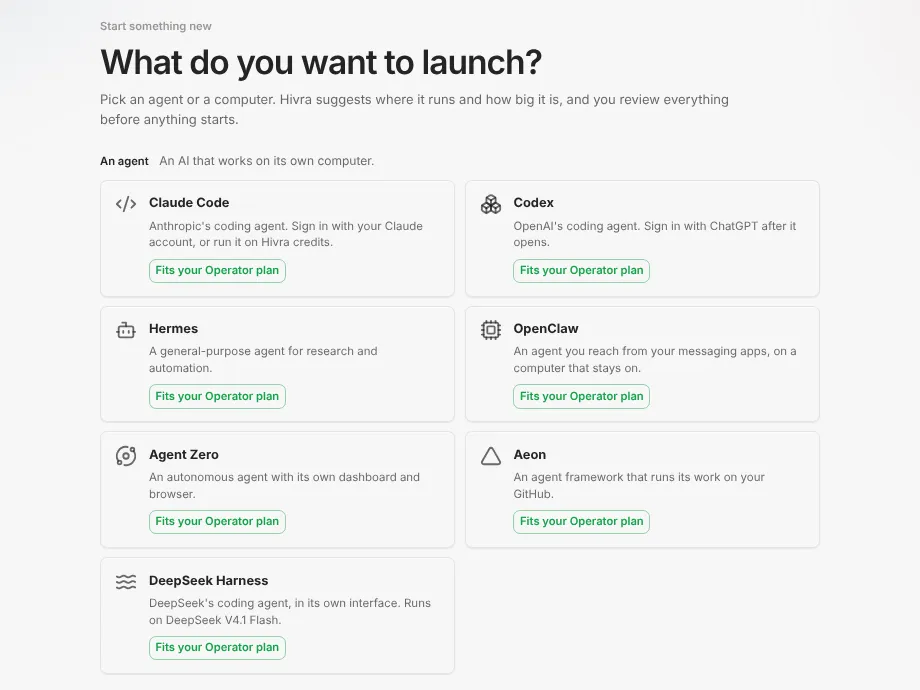
- Open Launch in the dashboard. The page is titled "What do you want to launch?" and lists the supported agents as tiles. Choose DeepSeek Harness. Its tile reads "DeepSeek's coding agent, in its own interface. Runs on DeepSeek V4.1 Flash."
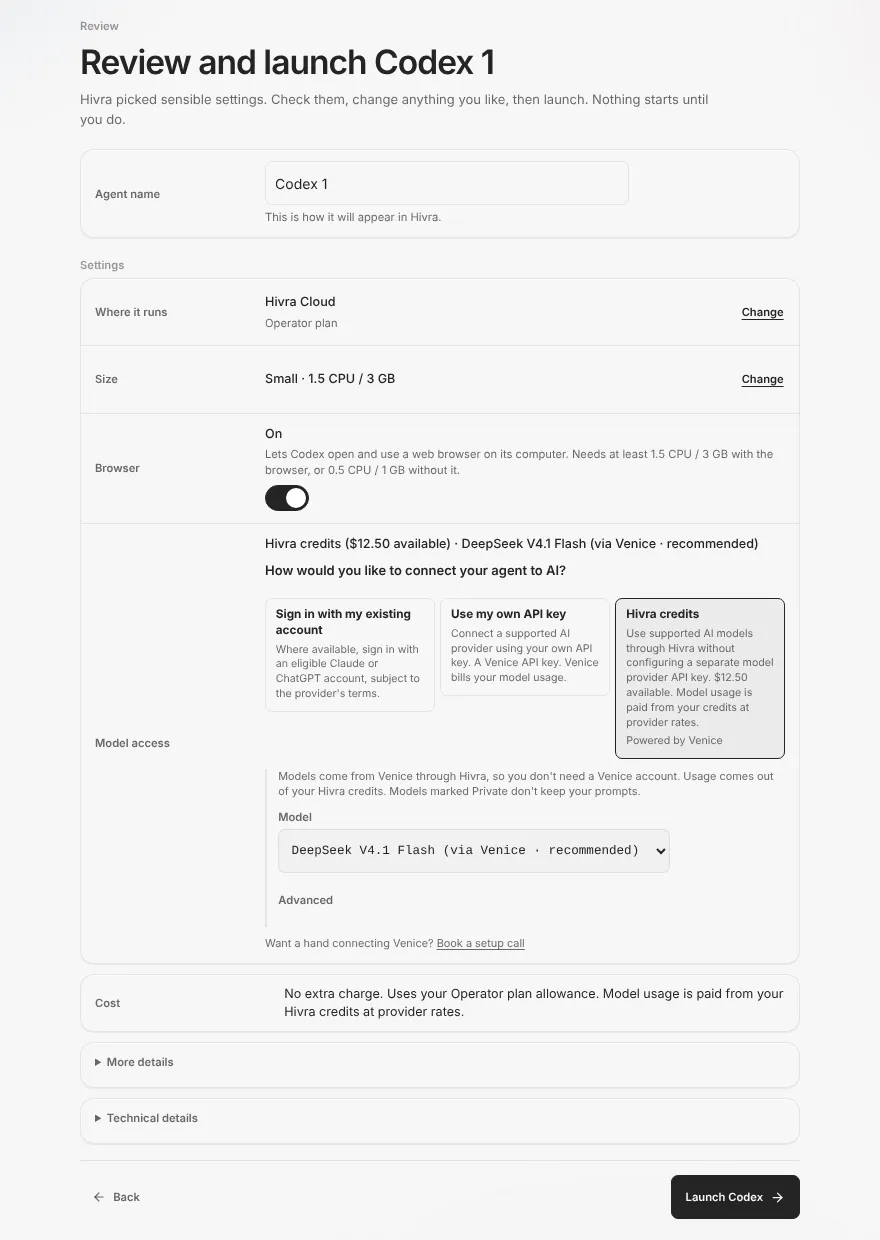
- The Review step opens with sensible settings and a title like "Review and launch DeepSeek Harness 1". Nothing starts until you press the launch button. Rename the agent in the Agent name field if you like. This is how it appears in Hivra.
- Check Where it runs. For DeepSeek Harness this is Hivra Cloud. Your own servers cannot run this agent, and Launch resets any earlier server choice to Hivra Cloud.
- Check Size. It shows the pinned size, for example 2 CPU and 4 GB. The Change control offers three presets: 2 CPU and 4 GB, 4 CPU and 8 GB, and 8 CPU and 16 GB. A bigger preset needs enough capacity on your plan (see plans and billing). There is no Browser toggle for this agent, because it launches with no browser.
- In Model access, press Hivra credits or Use my own API key. For credits, pick a model in the Model list. For your own key, paste a Venice key or pick a saved one, then pick a model.
- Read the Cost row. With credits it says model usage is paid from your Hivra credits at provider rates. With your own key it says the provider bills your model usage.
- Press the launch button, which reads Launch DeepSeek Harness.
The screenshot below is the Review step for a different agent, Codex, because the layout is shared. For DeepSeek Harness you will see the same Where it runs, Size, Model access and Cost rows, but no Browser row and no sign-in choice.
After you press launch, Hivra creates the computer and the agent's page opens. While it works, the page shows its progress. Watch the status rather than assuming a time: how long it takes depends on the host.
Open it and find your way around
DeepSeek Harness is a dashboard-style agent on Hivra. Its page groups the views like this:
| Group | View | What it is |
|---|---|---|
| Dashboard | Dashboard | DeepSeek's own interface, served from the computer through Hivra's authenticated gateway. This is where you work. |
| Computer | Files | A browser for the agent's computer, with a Files and Changes switch. |
| Computer | Terminal | A shell on the same computer. |
| Settings | Manage | Settings, power, size, recovery and updates for this agent. Opened from Settings in the sidebar. |
There is no Chat tab in the Hivra sense and no Browser tab, because DeepSeek's interface is the place you talk to the agent. The Computer group also shows a Desktop entry. An agent does not have a desktop of its own. That entry explains how to link the agent to one of your desktop computers. Open it from your Home page, or from the agent's own page, and the Dashboard view loads DeepSeek's interface at the root of the computer's address. Open your agent covers the views that are shared across supported agents.
Every time you open it, Hivra checks that the computer's connection service is reachable and signs the page in with a short handoff. You never paste a token. If the interface is still starting, you see "Starting DeepSeek…" with the line "DeepSeek is still starting on this computer. It opens here as soon as it's ready." The page keeps checking and opens the interface by itself when it is ready.
Files and Terminal are the same views other supported agents get on their computers. Use Terminal to look at what the agent has done, install a tool it needs, or check a repository. Use Files to see the home folder and, through the Changes switch, what has changed in a Git repository. Work you do in Terminal runs on the computer, not on your laptop.
Settings, power and updates in Manage
Open Settings in the agent's sidebar. Hivra's docs and some buttons call this area Manage (for example the Open Manage button on the status screens). The sections you can expect for DeepSeek Harness are Overview, Resources, Updates and Advanced, plus Recovery when it applies. Sections only appear when the computer can actually do what they offer.
- Overview shows the agent, its size, where it runs, and the Power controls: Stop, Restart and, once stopped, Start. Stopping shuts the computer down. Stop and Restart act at once for this agent, and Hivra cannot see whether DeepSeek is mid-task, so they end any running task without asking. Check that nothing is running first. Force off and Force restart under Advanced do ask you to confirm.
- Resources shows the size. DeepSeek Harness is pinned, so it keeps its CPU and memory.
- Updates holds Update connection service, covered next.
- Advanced always shows and holds the more drastic controls, including Force off and Force restart where the computer offers them.
- Recovery shows only when the computer lists restore points or folder recovery.
There is no Model & tools section for DeepSeek Harness. The model is set at launch and there is no delivery path to change it from Manage afterwards. To switch model or key, launch a new agent.
Update connection service brings Hivra's DeepSeek service up to date without restarting the computer. It restarts DeepSeek, which ends a task DeepSeek is working on. Your files, chats and model settings stay as they are. If the new version does not start cleanly, the previous one comes back, and terminals open on the page reconnect when it finishes. Because it interrupts work, only you start it. Hivra's automatic update sweep never runs it for DeepSeek Harness, so pick a moment when nothing is running.
This update refreshes Hivra's service on the computer. It does not change which upstream DeepSeek release you are on, which Hivra pins at an alpha release.
What runs where, and what it costs
| Question | Answer |
|---|---|
| Where does the agent run? | On its own Hivra Cloud computer. Not on your laptop. |
| Can it run on a server I connected? | No. Hivra Cloud only. |
| Does it have a browser? | No. It launches with no browser, and no Browser tab appears. |
| Who pays for the computer? | Your paid Hivra plan. |
| Who pays for the model? | Your Hivra credits at provider rates, or Venice if you used your own key. |
| Can I change the model later from Manage? | No. Model & tools is not shown for this agent. |
| Can I resize it? | Only within the allowed sizes of at least 2 CPU and 3 GB. It always keeps the size you set. |
Because credits and your own key are billed by different parties, a stalled agent can mean either a computer problem or a model-billing problem. Check Plan & billing for credits and the computer's status in Manage before you assume a fault.
When something goes wrong
These are the messages and states the product itself shows for this agent, with what to do.
| What you see | What it means | What to do |
|---|---|---|
| "DeepSeek Harness runs on Hivra Cloud only." | You tried to launch it on a connected server or your own cloud account. | Choose Hivra Cloud under Where it runs. You need a paid plan for that. |
| "Free account · needs a paid plan" | Your account has no paid plan, and Hivra Cloud computers need one. | Open Plan & billing, choose a plan, then return to Launch. |
| "DeepSeek Harness needs a model at launch: use Hivra credits or your own Venice API key." | The launch carried no model. | On the Review step, press Hivra credits or Use my own API key and finish that choice. |
| "Choose Hivra credits or your Venice API key for DeepSeek Harness." | You selected a sign-in route this agent does not take. | Pick one of the two offered choices. |
| "Check the key: it should be one line of 8 to 256 characters." | The pasted key is the wrong shape, often because of a line break or stray spaces. | Paste it again as one line. |
| "Choose a model from the list, or enter a valid model ID." | The model or Model ID is not recognised. | Pick from the Model list, or fix the ID under Advanced. |
| "Starting DeepSeek…" | The interface is still coming up. | Wait. The page opens it by itself. |
| "DeepSeek hasn't started" | The interface had not come up after the page's start wait. The product shows the heading with a curly apostrophe. | Press Open Manage, check the computer's status, then Try again. |
| "requires this Hivra installation's named HTTPS access" | This Hivra installation's named HTTPS access is missing, so it is not set up for this agent. | On Hivra Cloud contact support. On a self-hosted installation, configure named HTTPS access. |
| "Connection update needed" | The computer uses an older connection service and cannot open this surface securely. | Press Open Manage, go to Updates, run Update connection service, then Check again. Your computer and its data are unchanged. |
| "Couldn't verify secure access" | The connection service is not reachable yet. | Check status in Manage, then Try again. |
Other checks that help:
- Credits run out. The agent can stop being able to reach its model. Add credits in Plan & billing, or relaunch with your own Venice key.
- A task vanished after an update. That is expected: Update connection service restarts DeepSeek and ends a running task. Start it again afterwards.
- Sign-in to the interface drops. Reloading the page is general guidance, not a product message. Hivra signs the surface in again with a fresh handoff, and it re-checks the connection service while the page is open.
- The computer is stopped. Press Start under Power in Overview, then open the Dashboard view again.
If a message is not in this table, copy it exactly when you ask for help. The page Troubleshooting lists problems that are shared across agents.
What Hivra does and does not do
- Hivra creates the computer, installs DeepSeek Harness on it, gives it the model you chose at launch, and puts DeepSeek's interface behind your Hivra sign-in.
- Hivra does not modify DeepSeek's agent or claim to improve it, and does not offer it on a server you connected.
- Hivra does not let you change the model from Manage afterwards, and does not run its connection-service update on its own for this agent.
- Hivra does not promise that an agent's work is correct or safe. Review what it does, especially anything that touches a repository or a credential you gave it.
- Hivra is not affiliated with DeepSeek, and the terms of any provider account or key you bring are between you and that provider.
Common questions
Is DeepSeek Harness free on Hivra?
A Hivra account costs nothing, but DeepSeek Harness runs on a Hivra Cloud computer, and every Hivra Cloud computer needs a paid plan. Model usage is separate: it comes from your Hivra credits or from your own Venice key.
Can I run it on my own server?
No. DeepSeek Harness runs on Hivra Cloud only. A server you connected, or a computer in your own cloud account, cannot run it, and Launch says so if you try.
Why do I choose the model at launch and not later?
DeepSeek's own settings refuse a key that comes from a remote browser, so Hivra gives the agent its model while it launches. There is no Model and tools section for this agent in Manage, so to change model or key you launch a new agent.
Can I sign in with my own account instead of paying for credits?
No. The sign in with an existing account choice is never listed for DeepSeek Harness. You use Hivra credits or your own Venice API key.
What does alpha mean?
The upstream version Hivra runs is pinned at an alpha release, so expect early software. It is still launchable from Launch today. It also has no public agent page yet.
Does it have a browser?
No. It launches with no browser, so the agent page has no Browser tab. You work in DeepSeek's own interface, with Files and Terminal for the computer.
Will updating interrupt my work?
Yes, if a task is running. Update connection service restarts DeepSeek and ends a task it is working on, though your files, chats and model settings stay. Hivra never starts this update for you on this agent.